Browser Session Persistence in Cloud AI Agents
Restoring cookies alone fails when sites check device fingerprints between sessions.
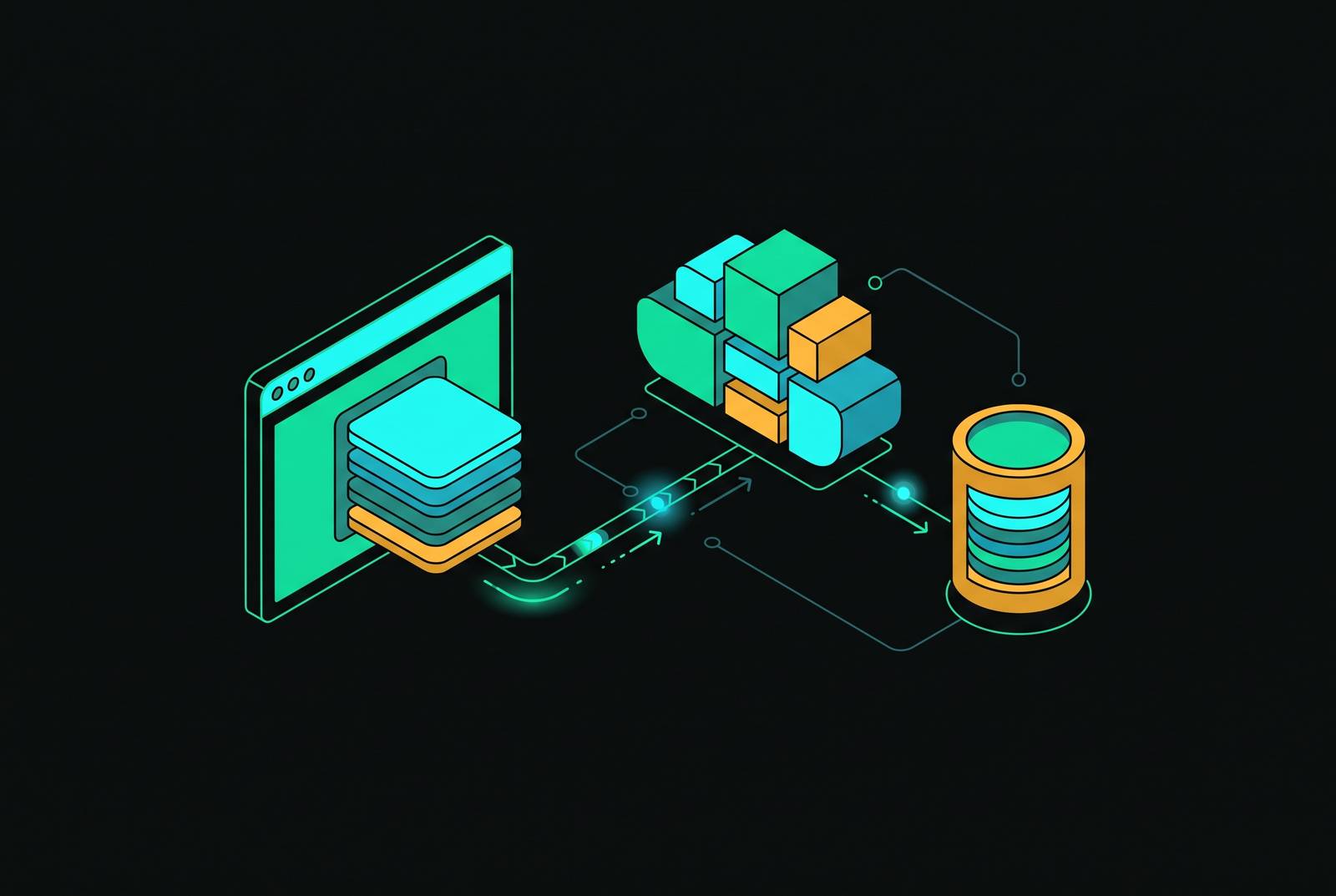
An agent logs into a banking site, completes its task, and shuts down cleanly. An hour later it wakes up, loads the same cookies, and the site locks the account. The cookies were never the problem. What changed is the fingerprint the browser presents: the device identity the site uses to decide whether a returning cookie jar belongs to a machine it recognizes.
Why Browser Sessions Break Between Agent Runs
Default launches in Playwright and Puppeteer start from nothing. No cookies, no localStorage, no record of a prior login: every run looks, to the site on the other end, like a brand-new device showing up for the first time. If developers save and restore cookies between runs, they fix the obvious half of the problem, and it works for simple sites. It fails on any site that checks more than the cookie jar.
The check that breaks it is fingerprinting. A browser exposes dozens of small, stable signals as it runs: a canvas rendering hash, a WebGL renderer string, specific AudioContext output values, among others. Each one individually looks like a minor implementation detail. Together they form a fingerprint that a site can use to tell whether the browser sitting in front of it today is the same browser that logged in last week. When an agent restores cookies but launches a fresh browser context, the fingerprint shifts even though the cookies did not. The site sees a known login credential arriving from an unknown device, and that mismatch is exactly the pattern fraud detection is built to catch. If a service checks the device, as banks and e-commerce checkouts do, it will flag this. This isn't a rare edge case that only shows up on a handful of hardened sites: it's the dominant reason authenticated browser agents fail in production.
A third failure compounds the first two. When several agents run against the same browser instance or the same user-data directory, cookies from one agent's session bleed into another's. That cross-contamination is the leading cause of account bans in any workflow that manages multiple accounts through shared infrastructure, and a platform typically detects it only after the fact, locking an account for behavior that looks, from the outside, like one identity logging in from two places at once.
What full session persistence requires: cookies, localStorage, and fingerprint identity as a single unit
Session persistence, done correctly, means keeping cookies, localStorage, IndexedDB, cache, and fingerprint identity together as one unit, bound to a single named profile, so that every time the profile starts up it presents the same device to the outside world. Most tooling solves a slice of that problem and calls it done.
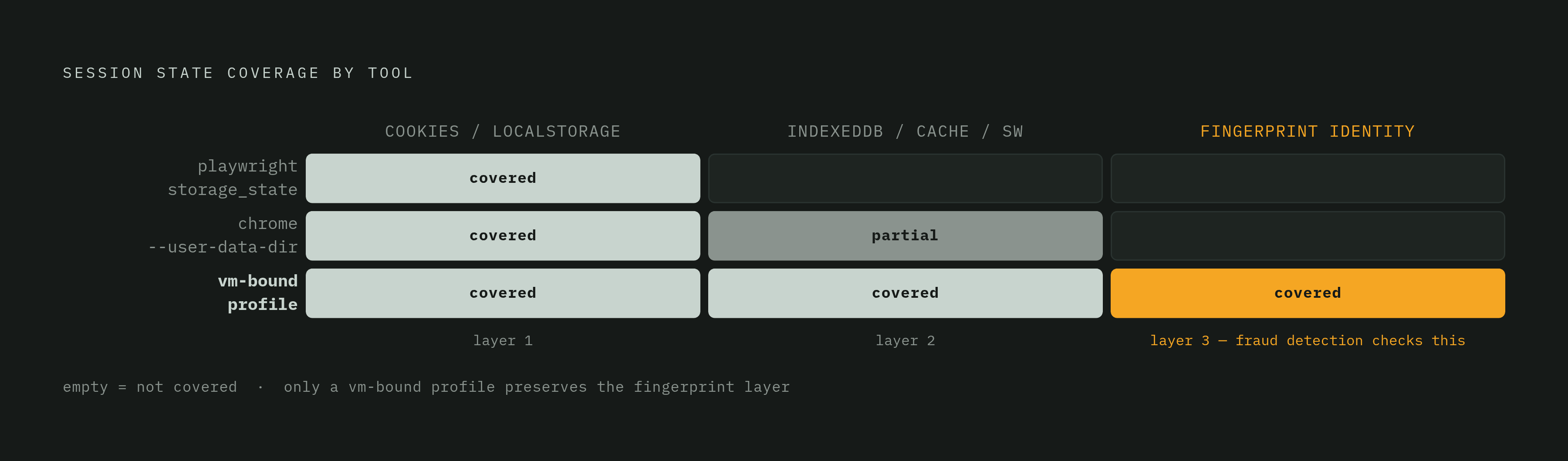
Playwright's storage_state export is the simplest approach: a JSON file holding cookies and localStorage. It covers the two most visible pieces of session state and misses everything else, IndexedDB, Service Workers, cache storage, and the browser's fingerprint. Any site doing real device checks will see through it.
Chrome's --user-data-dir takes a broader swing. It persists the full browser profile to disk, so it catches far more state than a JSON export. But a persistent directory also persists the signals that mark a browser as automated, and it offers no way to manage fingerprint consistency on its own. Worse, it locks that directory to a single process, so you can't run agents in parallel against the same profile.
Named browser profiles close the gap. A profile binds cookies, localStorage, IndexedDB, cache, and a consistent fingerprint into one object, so starting that profile always presents the same device identity, not a reconstruction of one. This is the correct shape for the problem, but it exposes a harder truth underneath it: no application-layer tool can fully deliver on it. An application can restore a JSON file. It cannot restore a consistent, kernel-level device identity without controlling the browser process itself and the environment that process runs in. That control lives below the application, in the infrastructure hosting the browser.
The Infrastructure Boundary for Fingerprint and Filesystem State
So once you frame the problem as identity plus filesystem state plus isolation, the question is no longer which library to use, but which compute environment can hold all three together without dropping one. That question has a specific answer: virtual machines.
Containers share the host kernel. A container running a browser session can be stopped, rescheduled, or moved by an orchestrator at any point, and when that happens the user-data directory and any in-memory fingerprint state go with it, often silently. The container comes back, but the identity it had doesn't come back with it in any guaranteed way.
Serverless functions are built to be stateless. Each invocation can land on different hardware entirely, which makes a persistent user-data directory structurally impossible without bolting on an external storage mount, and that mount introduces its own latency and consistency problems. Neither environment was designed to hold a browser profile steady across time.
A VM-level boundary gives the browser process something neither of those can: a stable kernel, a persistent disk, and a device identity that holds through sleep, redeploy, and restart, the three lifecycle events most likely to break session state everywhere else. A named profile only delivers its guarantee because it binds to a filesystem path that has to stay fixed across restarts, and a reschedulable container can't promise that path will still be there next time. Security follows the same line: because containers share a host kernel, a kernel exploit inside one container can reach the whole host. A VM-grade boundary keeps a compromised browser process locked away from the host and from any other agent's session running alongside it.
Micro-VM Isolation and the Kernel-Level Guarantee for Session Persistence
Firecracker is the clearest example of a VM boundary that meets this requirement without paying the usual VM performance tax. It uses the Linux kernel's own KVM to create and run microVMs, each with its own kernel, and it launches in under 150 milliseconds with less than 5MB of memory overhead. That puts real hardware isolation within reach of workloads that previously had to choose between the speed of a container and the guarantees of a full VM. AWS runs Lambda's sandboxing on Firecracker, and it backs more than 15 trillion requests a month, so the technology has years of production load behind it, not just a lab demo.
Applied to browser sessions, this matters in one specific way: the user-data directory, the fingerprint-generating state, the cookie jar, and localStorage all sit on the same rootfs that gets snapshotted with the VM. They come back atomically when the VM is restored, as part of the machine, not reassembled piece by piece through some script running after the fact. That distinction, atomic restore versus application-layer reconstruction, is the same one that separates a named profile from a storage_state file, just enforced one layer down.
Firecracker's device model is worth a brief note for anyone running headful sessions. It doesn't support VFIO device passthrough; it uses virtio-over-MMIO with no PCI bus, and a passthrough feature has been proposed but hasn't merged into the main branch. For most browser automation this doesn't matter, since the work is headless. For agents that need GPU rendering in a visible browser, it's a limitation worth tracking today.
How snapshot-restore scheduling makes persistent VM-per-agent economically viable at scale
The standard objection to giving every agent its own persistent VM is cost: a fleet of thousands of individually isolated machines sounds like a fleet of thousands of running bills. Snapshot-restore scheduling removes that objection because it separates the cost of keeping state from the cost of running compute.
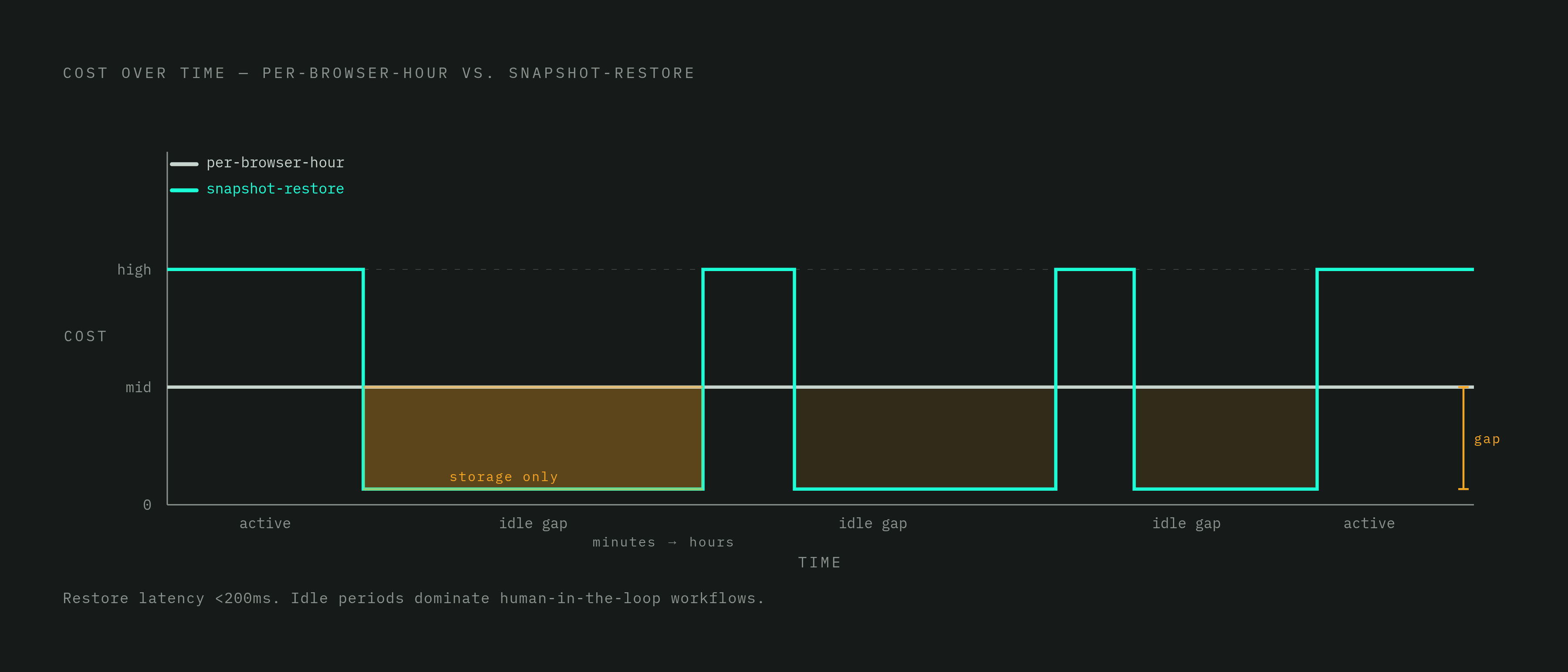
The mechanism is simple. Boot the VM once, take a snapshot of it running, and restore that snapshot every time the agent needs to work again. The restored VM comes back fast, close to the speed of pulling a machine from a warm pool of pre-started VMs, but without paying to keep an idle fleet running in the background the whole time. When an agent has nothing to do, it gets snapshotted and suspended, and the compute bill for that agent drops to zero. The only ongoing cost is storing the snapshot, and that costs far less than keeping compute active.
So the bill looks structurally different from per-browser-hour pricing, which charges for the browser however you use it. If an agent's browser sits open waiting on a slow model response, the meter keeps running under hourly pricing. Under snapshot-restore, a suspended VM costs only its storage, regardless of how long it waits. If agents are built around human-in-the-loop steps, where a person might take minutes or hours to respond, that gap can decide whether the whole product is financially workable. A fleet of thousands of persistent, isolated, per-agent VMs gets cheap once most of them spend most of their time suspended.
Production Failure Modes for Browser Sessions at Fleet Scale
The failures that show up at fleet scale trace back to infrastructure choices, not to bugs in agent logic, and most stay invisible until an account ban or a failed task reveals them days later.
The most common one is silent cookie write-back loss. A session starts, the agent logs in successfully, and everything looks fine, but if persist: true isn't set on every session rather than just the first one, the cookie changes from that run never get saved. The next run re-authenticates from scratch, and the cycle repeats run after run without raising any error, which makes it one of the harder failures to catch in testing.
Anti-bot systems also watch for automation markers that build up inside a --user-data-dir over time. A profile that starts out clean can still fail a fingerprint check later, once enough runs have left small automation signals behind that nobody managed.
Fleets that share browser infrastructure across agents run into cross-session contamination: cookies from one agent's session end up attached to another agent's request, and the wrong account ends up taking an action it never initiated. That failure doesn't throw an exception. An account ban reveals it later, with no clear link back to the run that caused it.
Even sessions that persist correctly aren't fully safe. Long, multi-step tasks running against live sites still fail from small errors compounding over many steps, and indirect prompt injection, where malicious content on a page manipulates the agent, remains an open security problem. Solving persistence removes one class of failure. It doesn't remove the need for careful handling of what the agent does once it's logged in.
Architecting a Persistent, Isolated Browser Session for an AI Agent
Everything above points to the same four decisions, made together rather than one at a time, for a browser session to hold up across sleep, redeploy, and scale.
The first is the isolation boundary. Each agent needs its own VM, not a slot in a shared container or a serverless function. The VM is what gives you a stable kernel, a filesystem path for the user-data directory that won't shift under the agent, and hardware-level separation from every other agent's session.
The second is profile architecture. Each agent needs a named browser profile that owns its cookies, localStorage, IndexedDB, cache, and fingerprint parameters as a single unit, bound to the agent's identity. Binding to identity rather than to a session is what lets the profile survive a process restart intact.
The third is write-back discipline. Cookie and state saving has to run on every session, not only at creation. The gap between loading a session and saving it back is exactly where fleets lose state without noticing, as the earlier failure modes show.
The fourth is idle scheduling. An agent not actively running a browser task should be snapshotted and suspended, dropping its compute cost to the cost of storage while keeping its full state, browser profile, cookies, filesystem, and in-memory data, preserved exactly and ready to restore in under 200 milliseconds when the next task arrives.
For fleets running many tenants at once, you should cryptographically bind each profile to its agent's identity, so cross-tenant access is closed off at the infrastructure level instead of relying on application code to enforce it. Pairing that with a sticky IP assigned to the same profile keeps the network identity a site sees consistent with the browser fingerprint it's checking, so the two signals a fraud system compares against each other always agree. Handled this way, session persistence changes from something a team has to keep working to fix into a property the infrastructure simply guarantees, configured once per agent and held steady from there.